Speed up your site by optimizing images the right way; compress, resize, and convert to cut load times fast.
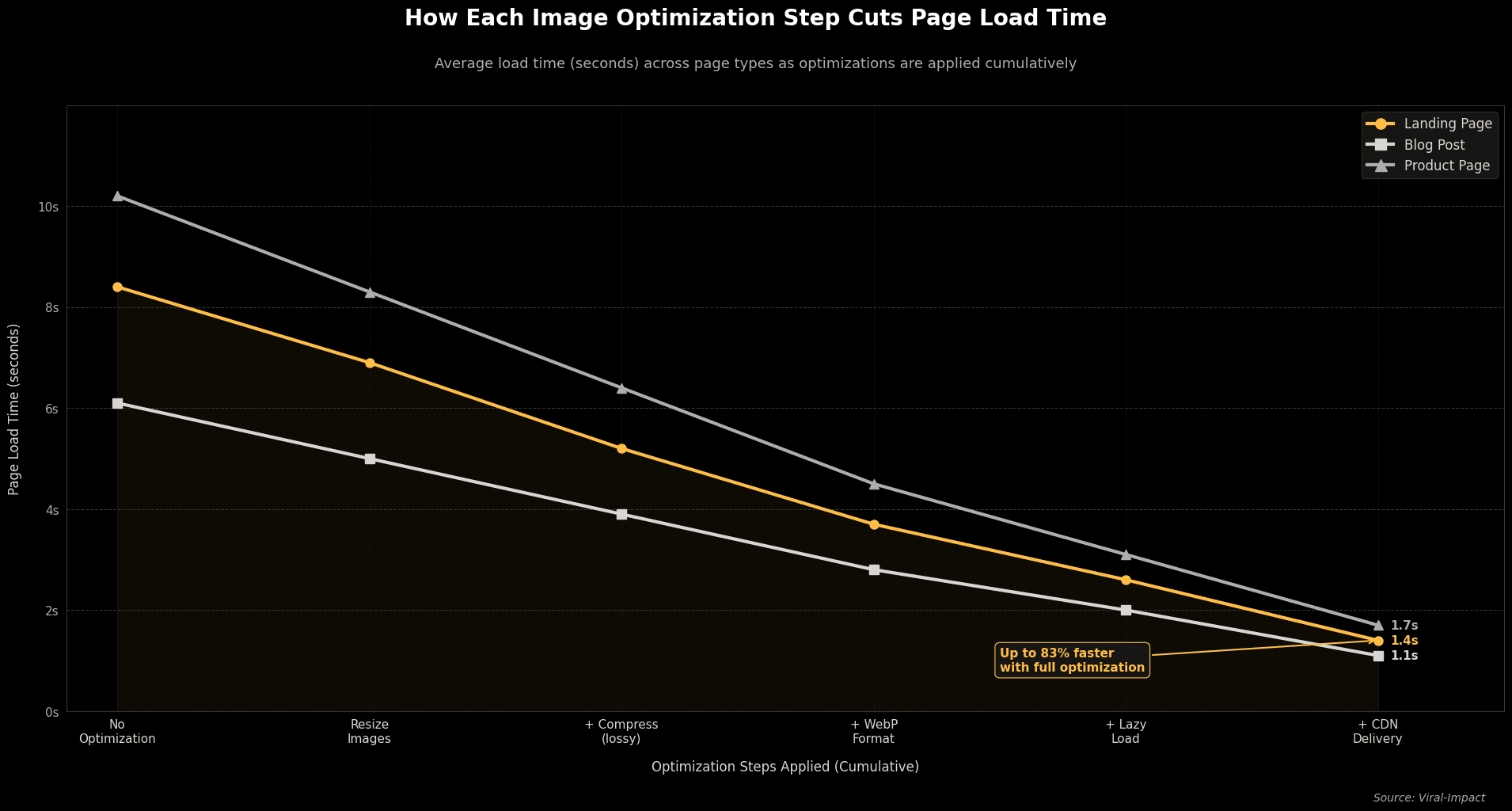
Optimize images by compressing them, resizing to display dimensions, converting to WebP format, and using lazy loading. Done right, these four steps can cut page load time by over 60%, without touching a single line of code.
Why Do Images Slow Down Your Website?
Images are usually the heaviest files on any web page. One uncompressed hero image can hit 5 MB; enough to push load time past 5 seconds on mobile. Google measures Largest Contentful Paint (LCP) as a direct ranking signal, and slow images are the #1 cause of a poor LCP score.
• Uncompressed PNGs are often 5–10× larger than necessary.
• Images uploaded at 3000px but shown at 800px waste bandwidth on every request.
• Images below the fold loading immediately add needless weight to the initial page load.
Which Image Format Should You Use?
WebP is the go-to format for 2026. It's about 30% smaller than JPEG at equal quality and works in every modern browser.
Quick Format Reference
Format | Best For | File Size | Use It? |
WebP | All web images | Small | Primary |
AVIF | Photos, hero | Smallest | When supported |
SVG | Logos, icons | Tiny | Always |
JPEG | Photos (legacy) | Medium | Fallback only |
PNG | Logos (legacy) | Large | Logos only |
How Do You Compress Images Without Losing Quality?
Use lossy compression at 75–85% quality. The visual difference is undetectable to most people, but the file size drops dramatically.
• Free tools: Squoosh (best for manual conversion), TinyPNG, ImageOptim.
• WordPress: ShortPixel or Imagify compress automatically on upload.
• Target under 100 KB for standard web images; 150–200 KB max for hero images.
Resize images to your theme's actual display width before uploading. If the template shows images at 800px, uploading a 3000px file serves 3× the pixels needed, and charges every visitor for it.
What Is Lazy Loading and How Do You Add It?
Lazy loading delays image downloads until the user scrolls near them. It's a one-attribute HTML change:
<img src="photo.webp" loading="lazy" alt="Your description">
Don't apply it to your hero or logo; above-the-fold images need to load immediately. Everything else is fair game. Pair this with a CDN (Cloudflare, Bunny.net) to serve images from servers near your visitors.
Speed directly affects search rankings and SEO and AEO performance; faster Core Web Vitals scores improve both Google positions and AI Overview eligibility.
If you're rebuilding or launching a new site, a proper website design and development setup handles image architecture from day one, so you're not patching performance issues later.
The Bottom Line
Image optimization is one of the cheapest, highest-return performance improvements a startup can make. Convert to WebP. Resize to display dimensions. Compress to under 100 KB. Add lazy loading below the fold. Those four changes will move the needle on load time, bounce rate, and search rankings.
The team at Viral Impact builds image performance into every SEO and web project from the start; visit viral-impact.com to see how we help startups grow without burning budget on slow, underperforming sites.