Learn how to create a SaaS explainer video that captures attention, explains your product clearly, and drives more signups.
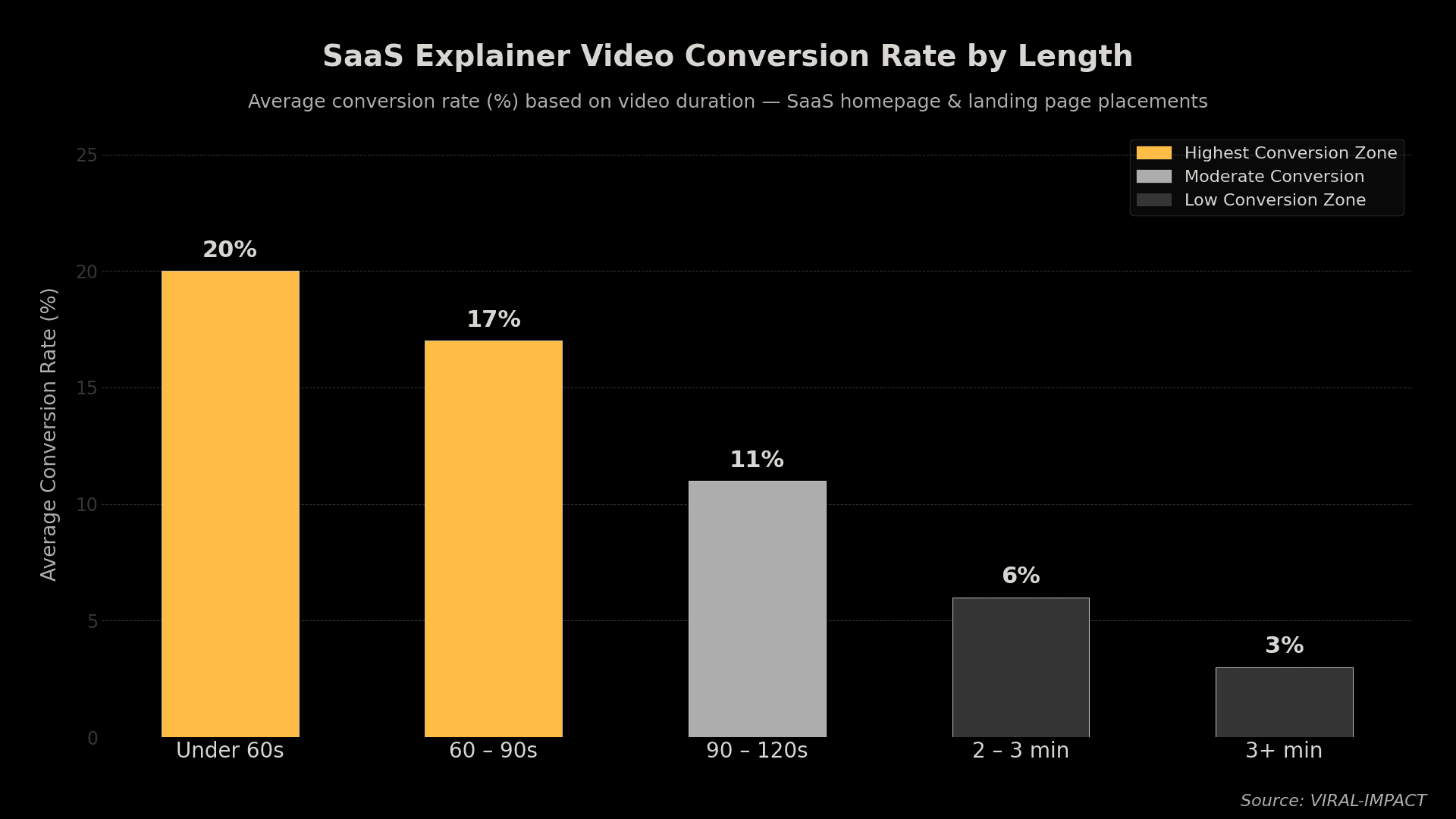
To create an explainer video for a SaaS product, write a tight script focused on one problem, pair it with clean visuals, and keep the total runtime under 90 seconds. Short, focused videos consistently outperform long feature walkthroughs when it comes to driving signups.
What Makes a Great SaaS Explainer Video?
Most SaaS products solve real problems, but most explainer videos still manage to lose people in the first 10 seconds. The issue is rarely the product. It's the framing.
A good explainer video does three things fast:
• Names the problem your audience actually has.
• Shows how your product fixes it.
• Tells the viewer what to do next.
No feature lists. No jargon. No 3-minute product tour nobody asked for. Most viewers decide within the first 8 seconds whether they'll keep watching, so your opening line carries more weight than the rest of the video combined.
Step-by-Step: How to Create a SaaS Explainer Video
Here's a process that works, whether you're building it in-house or working with a production team:
• Define your one message. Pick the single biggest outcome your product delivers, not five features. "We help sales teams cut follow-up time by 40%" beats "AI-powered CRM with multi-channel integration."
• Write the script first. Aim for 120–150 words per minute of video. A 90-second video needs roughly 180–200 words. Start with the problem, not the product.
• Storyboard the visuals. Sketch what happens on screen at each moment. Visuals should support the narration, not repeat it word for word.
• Record voiceover or choose a narrator. A clear, natural voice matters more than production quality. Flat reads kill engagement.
• Animate or record your video. Screen recordings mixed with simple motion graphics often outperform over-produced animations for SaaS products.
• Add music and captions. Keep background music subtle. Captions aren't optional; over 85% of social video is watched without sound.
• Publish and test. Place the video above the fold on your homepage or landing page. Track play rate, watch time, and conversion lift.
What Should a SaaS Explainer Video Script Include?
A script that converts follows this structure:
• Hook (0–5s): Call out the exact frustration your user feels before you mention your product.
• Problem (5–15s): Make them feel the pain before you solve it. Specificity wins here.
• Solution (15–45s): Show how your product works. Keep it simple, one or two screens max.
• Proof (45–60s): One stat, one result, or one customer outcome. Don't stack five claims.
• CTA (60–90s): One action only start a trial, book a demo, or watch more.
How Long Should a SaaS Explainer Video Be?
Under 90 seconds. Videos between 60 and 90 seconds tend to drive the highest conversion rates. Once you cross 2 minutes, drop-off increases sharply, and conversions follow.
If your product genuinely needs more explanation, build a separate walkthrough video to handle deeper onboarding. The explainer's only job is to make someone want to learn more.
What Tools Do SaaS Teams Use to Create Explainer Videos?
You don't need a big budget to get started. These are the tools that come up most:
• Script writing: Google Docs, Notion
• Animation: Vyond, Animaker, Motion Array
• Screen recording: Loom, Descript
• Editing: Adobe Premiere, CapCut, Descript
• Voiceover: ElevenLabs (AI), Voices.com (professional), or in-house recording
If you want a professional result without managing freelancers, the Explainer Videos service at Viral Impact handles scripting, animation, and production in one place.
For a broader view of production tools, this guide to video marketing tools for startups breaks down options by budget and use case.
The Bottom Line
An explainer video is often the first real impression a visitor gets of your product. Get the message wrong, and you lose them before they scroll. Get it right, and it becomes the highest-converting asset on your site.
Keep it short. Lead with the problem. End with one clear action. And don't let production complexity become an excuse to delay a well-written script on a modest budget, which will outperform a polished video with a weak message every time.
If you want help building a video that actually converts, Viral-Impact works with SaaS startups to script, produce, and publish explainer videos built for organic growth.