Why Your Emails Land in Spam: A Technical Investigation
Emails land in spam because spam filters score messages against dozens of technical, content, and reputation signals. Failing even a few checks silently reroutes your messages away from the inbox, often with no warning to the sender.
How Spam Filters Actually Work
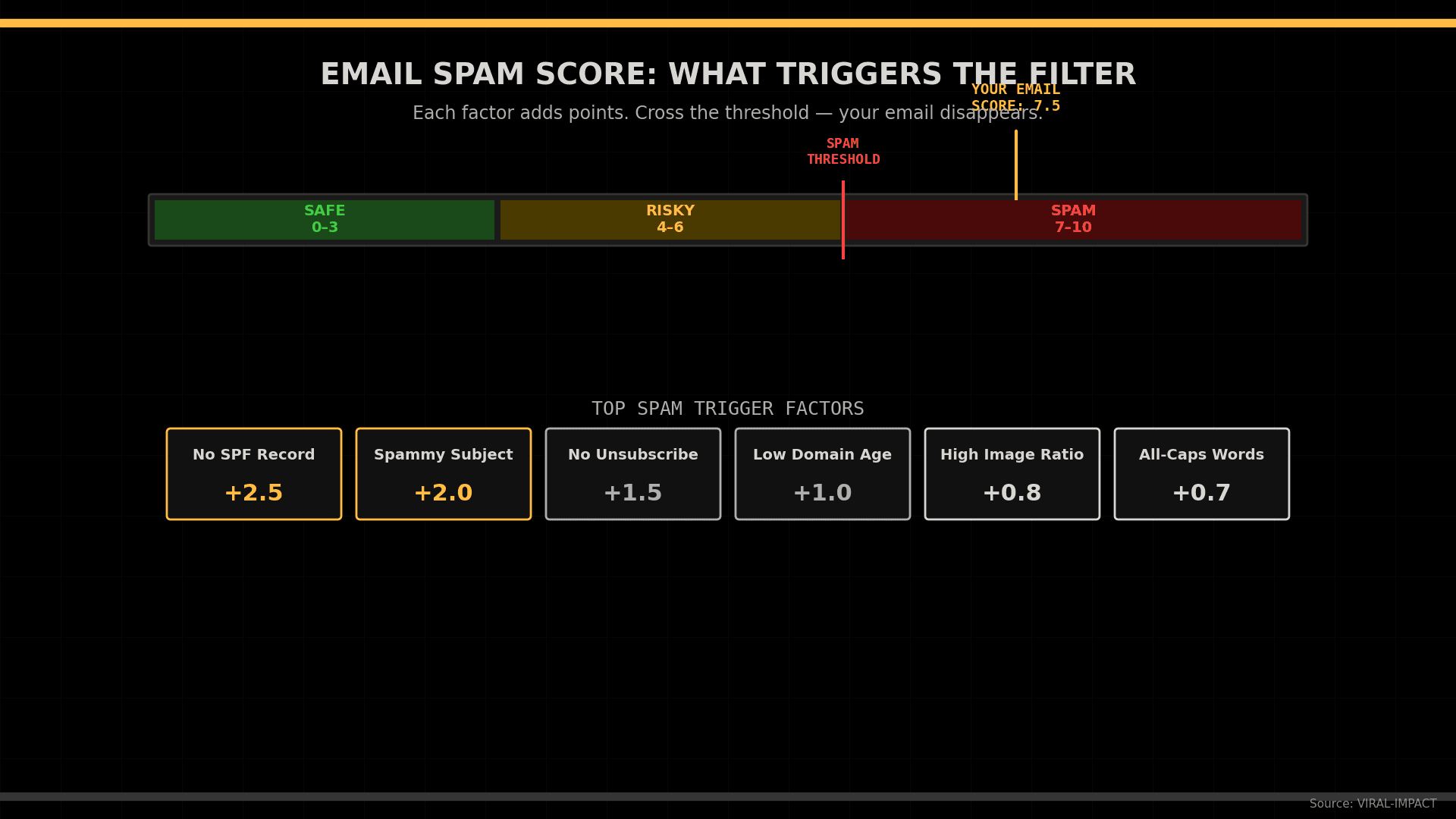
Most people assume spam filtering catches obvious junk. The reality is more mechanical. When an email hits a receiving mail server, it passes through a multi-layered scoring engine system like SpamAssassin, Google's spam infrastructure, or Microsoft's Exchange Online Protection that assigns a cumulative score. Exceed the threshold, and the message goes directly to spam without any notification to the sender.
These filters evaluate three broad categories simultaneously: authentication signals, sender reputation, and content analysis. Missing the mark on any one layer raises the score; miss on multiple, and delivery failure is near-certain.
The core signals spam filters evaluate on every incoming message:
• Whether your sending domain is authenticated through SPF, DKIM, and DMARC.
• Your domain and IP sender reputation scores based on historical sending behavior.
• The structure, language, and HTML quality of the email body.
• Whether your technical infrastructure is correctly configured.
Authentication Failures: The Most Common Technical Cause
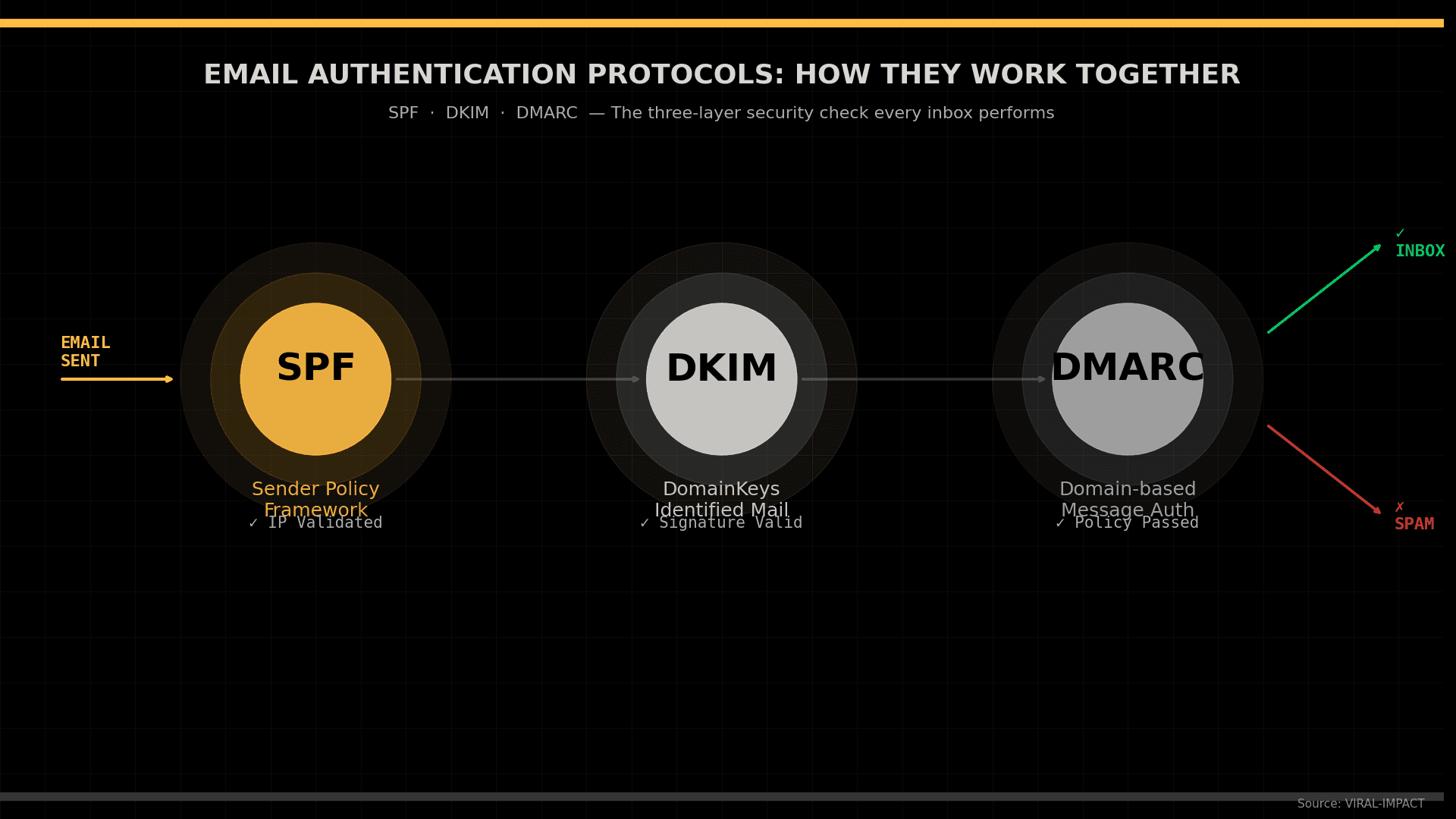
Email authentication is the most widespread technical reason emails land in spam. Three protocols form the foundation of sender identity verification, and most spam filters treat missing or misconfigured records as an immediate red flag. Google's sender guidelines require all bulk senders to have valid SPF, DKIM, and DMARC records in place. Each performs a distinct verification function:
• SPF (Sender Policy Framework): A DNS TXT record listing IP addresses authorized to send on behalf of your domain. If you send from an unlisted IP, receiving servers treat the message as potentially spoofed.
• DKIM (DomainKeys Identified Mail): A cryptographic signature added to outgoing messages and verified against a public DNS key. A failed or missing DKIM signature indicates the message may have been altered.
• DMARC (Domain-based Message Authentication): A policy record specifying what receiving servers should do when SPF or DKIM fail. Without it, authenticated domains still lack a critical enforcement layer.
Table 1: Email Authentication Protocols Compared
Protocol | DNS Record | What It Validates | Failure Impact |
SPF | TXT Record | Authorized sending IPs for your domain | Message flagged as potential spoofing |
DKIM | TXT (CNAME) Record | Cryptographic signature on message headers | Filter scores rise; signature mismatch logged |
DMARC | TXT Record | Policy alignment between SPF and DKIM | No policy enforcement; spoofing is undetectable |
BIMI | TXT Record | Brand logo verified against DMARC | No brand indicator in inbox; lower trust signal |
Sender Reputation and Domain Score
Even with perfect authentication, a damaged sender reputation routes every email to spam. Receiving servers maintain real-time scores for both your IP and domain, built from behavioral history across millions of messages.
The behaviors that directly damage the sender's reputation:
• High bounce rates: your list contains too many outdated or invalid addresses
• Spam complaints: each complaint reduces your domain trust score in real time
• Sudden volume spikes: sending thousands from a domain that usually sends dozens triggers anomaly detection
• Low engagement rates: unopened messages signal to filters that your content has no value
• Spam trap hits: sending to honeypot addresses marks your IP as a persistent threat
Rebuilding reputation is slow weeks of low-volume sending before scores recover. If you are running a serious email outreach program, infrastructure and list hygiene are the foundation on which everything else rests.
Content Signals That Spam Filters Catch
After authentication and reputation, spam filters analyze the message itself. This is where many marketers create deliverability problems without knowing it.
The most common content triggers that raise spam scores:
• Spammy subject lines: All-caps words and phrases like "Act Now" or "Limited Offer" add points immediately.
• High image-to-text ratio: An email that is mostly a single image with minimal body text is a recognized spam pattern.
• Missing unsubscribe link: Required by CAN-SPAM and GDPR, and an automatic red flag for most filter engines.
• Broken HTML: Poorly coded emails with unclosed tags suggest bulk tools generating low-quality output.
• Spam trigger phrases: Words like "free money" and "guaranteed results" carry high individual scores in most filters.
Research from Litmus shows emails with clean HTML, a plain-text version, and a visible unsubscribe link outperform those without. If your cold outreach emails are disappearing, content structure is the first thing to audit.
Table 2: Common Spam Trigger Factors and Score Impact
Spam Trigger Factor | Score Impact | How to Fix It |
Missing SPF / DKIM / DMARC | +2.0 to +3.5 | Add all three DNS authentication records immediately |
ALL-CAPS words in subject line | +1.5 to +2.0 | Use sentence case; avoid urgency-heavy phrasing |
No plain-text version of the email | +1.0 to +1.5 | Always include a plain-text alternative alongside HTML |
High image-to-text ratio | +1.0 to +1.8 | Balance images with readable body text (60/40 rule) |
Missing or broken unsubscribe link | +1.5 | Always include a one-click unsubscribe per CAN-SPAM |
Sending from a blacklisted IP | +3.0 to +5.0 | Run MXToolbox check, request delisting; use dedicated IP |
Trigger phrases (free, guaranteed, no risk) | +0.5 to +1.5 each | Replace with plain language and specific value statements |
Technical Infrastructure Issues That Break Deliverability
Infrastructure problems are less obvious than content errors but equally damaging. Many businesses set up email accounts and never audit the underlying technical setup. The most impactful issues to address:
1. Reverse DNS mismatch: Your sending IP should resolve to a hostname matching your domain. Mismatches are treated as suspicious by most receiving servers.
2. Shared IP contamination: On shared platforms, other senders using the same IP affect your reputation scores whether you know it or not.
3. Low domain age: A domain registered recently that immediately sends large volumes gets treated as a threat. A structured organic growth plan includes warming up your domain before running campaigns.
4. HTTP links: Emails containing insecure destination URLs raise content scores and reduce recipient trust.
5. Missing BIMI record: Brand Indicators for Message Identification signal legitimacy to major providers and increase inbox trust.
How to Test and Monitor Email Deliverability
Fixing spam issues starts with knowing exactly what the filters see. The most useful email deliverability testing tools are:
• Google Postmaster Tools: Free tool showing your domain and IP reputation scores directly from Gmail.
• Mail Tester: Runs your message through SpamAssassin and returns a scored report with specific issues.
• MXToolbox: Checks DNS records, MX configuration, and whether your IP appears on public blacklists.
• GlockApps: Simulates delivery across Gmail, Outlook, and Yahoo to show actual inbox or spam placement.
Technical health is non-negotiable across every channel. Your SEO strategy and email programs share the same requirement: visibility. A well-optimized landing page only converts if campaigns driving to it actually arrive. Run a deliverability audit before every major send; it takes minutes and prevents wasted effort.
Suggested Data Visualizations
Three charts suit this topic, all at 1920x1080px using Viral Impact brand colors on a #000000 background with "Source: VIRAL-IMPACT" bottom-right:
• Line Chart: Inbox placement rates over 12 months, fully authenticated senders vs. partial vs. unauthenticated.
• Lollipop Chart: Top 8 spam trigger factors ranked by score impact, horizontal orientation.
• Donut Chart: Spam failure breakdown by category: Authentication, Reputation, Content, Infrastructure.
FAQs
Q1:Why do my emails go to spam even though I have SPF set up?
SPF alone is not enough. Spam filters expect all three layers, SPF, DKIM, and DMARC, to be configured correctly. A missing DKIM signature or an absent DMARC policy still triggers spam routing even with a valid SPF record.
Q2:Can a new domain hurt my email deliverability?
Yes. New domains have no sending history and no established reputation. Gmail and Outlook treat high-volume sending from new domains as suspicious. A structured warm-up period, starting with low volumes and scaling gradually, is the standard fix.
Q3:What spam score is considered safe?
SpamAssassin defaults to a threshold of 5.0, but most professionals target below 3.0. Scores between 3 and 5 sit in a risky range where some providers filter the message, and others pass it. Above 5 means near-certain spam placement.
Q4:How do I check if my IP is blacklisted?
Use MXToolbox or MultiRBL to check against major public blacklists. If your IP appears on Spamhaus, Barracuda, or SURBL, request removal and fix the root cause before sending again.
Q5:Does email engagement affect deliverability?
Yes, directly. Gmail and other providers use open rates, replies, and inbox moves as trust signals. Repeated sending to disengaged lists trains filters to route your messages to spam. Regular list cleaning is the most effective countermeasure.
Email remains one of the highest-ROI channels available, but only when messages reach the inbox. Authentication gaps, reputation damage, content triggers, and infrastructure flaws are all fixable, but only once you know they exist. Treat inbox placement as a metric you actively track. Build authentication into your DNS from day one, keep lists clean, and test before every send. The difference between an email that converts and one that vanishes is almost always a technical decision made before anyone sees the subject line.
Struggling with email deliverability and inbox placement? Viral Impact builds the technical foundation, content strategy, and outreach systems that put your emails where they belong. Talk to us and get your campaigns performing the way they should.
Read more

Learn which marketing skills remain irreplaceable as AI transforms search, content, and strategy for the next decade.

Learn how to reposition your startup brand after a pivot and maintain marketing momentum without losing your audience.
Learn the key differences between AEO and SEO and discover which strategy your startup should prioritize in 2026.